
Are You Paying for Branded Search Clicks You Would Have Earned Anyway?
Your brand campaign probably has the best ROAS in the account. That's exactly why it deserves a harder look.
Branded paid search usually delivers the best numbers in your ad account, boasting low acquisition costs, high conversion rates, and impressive return on ad spend (ROAS). That makes sense: people who type your company name into Google already know who you are.
That's also the problem. Would those people have reached your site if you hadn't paid for the click?
If you rank first organically for your own name, a searcher already has a free path to you. Buying the sponsored listing above it may change which link they click without adding a single visit. Google Ads will count the paid click and the subsequent conversion. It can't tell you whether that visit was new.
We see this distinction come up in nearly every paid search account we audit. A brand campaign can be very profitable on an attributed basis and still be a poor place to put the next dollar.
The Scenario We See Most Often
A company spends $10,000 a month on branded ads. The dashboard shows low CPCs, lots of leads and great ROAS, so the team raises the budget.
As paid brand clicks rise, organic clicks drop by roughly the same amount. Total search traffic stays flat, but paid media takes credit for the visits you were already getting.
So ask a different question: “How much business did brand search create beyond what we'd have earned organically?”
You can get a solid first answer from two tools you already have: Google Ads and Google Search Console.
Step 1: Agree On What Counts as a Branded Query
Build one consistent list of brand queries. At a minimum, include your exact company name and common misspellings. Then add clear navigational variants such as "brand + product," "brand + login," or "brand + pricing."
A documented regex (a pattern-matching rule) helps with multiword or easily confused brand names. Use the same definition in both tools, even though the filter syntax differs.
In Google Ads, work from search terms (what people actually typed), not the keywords you bid on. Broad- and phrase-match brand keywords can capture queries with very different intents.
What we've seen: At an HR-tech SaaS client, the keyword report showed nearly all brand spend sitting on four root brand keywords. The search-term report told a different story: hundreds of real queries, including login and partner-portal searches from existing customers. About 10% of brand spend went to one cluster of legacy, co-branded queries. That's people looking for a login page, not prospects. You can't see that split at the keyword level.
Keep the comparison tight by using identical date ranges, geographies, devices, and search properties. Ads targeting and organic coverage are never identical, and some low-volume queries won't show up in either report. Note the gaps and move on.
Step 2: Put Paid and Organic Clicks Side by Side
Build a simple weekly view of your brand query list:
| Measure | What it tells you |
|---|---|
| Search Console brand impressions | A rough proxy for searches where you appeared organically |
| Search Console brand clicks | Organic traffic from those searches |
| Google Ads brand search-term clicks | Paid traffic from those searches |
| Google Ads brand cost | What you spent on those paid clicks |
| Combined clicks | Paid clicks plus organic clicks |
Then track one diagnostic, which we call the combined brand click rate:
(Organic brand clicks + paid brand clicks) ÷ organic brand impressions
This is a directional signal, not a true click-through rate. Search Console impressions count your organic appearances, not every brand search. One search can show several of your listings, and paid and organic reports measure different things. The number can even go above 100%. Watch whether it moves when spend moves.
If you can, also link Google Ads and Search Console and use the Paid & organic report. It gives you combined clicks and combined queries, which is a cleaner denominator than treating organic impressions as total demand.
Step 3: Watch What Happens When Spend Changes
Now, chart brand spend against total brand clicks from both sources. If paid brand is adding traffic, total clicks should rise with spend after accounting for changes in demand. If it isn't, you'll see paid clicks rise, organic clicks fall, and the total stay flat.
Here's a simple example:
An extra $2,000 in brand spend buys 1,000 more paid clicks.
Over the same period, organic brand clicks fall by 900.
Net gain: 100 clicks.
The $2 CPC on the dashboard is actually $20 per net-new click. That's a descriptive estimate, not proof, because demand or rankings may also have shifted. But it tells you exactly where to dig.
Two Ways to Pay for Clicks You’d Get Anyway
Across client audits, ad cannibalization usually shows up in one of two ways, one of which stays completely hidden on standard paid-versus-organic charts.
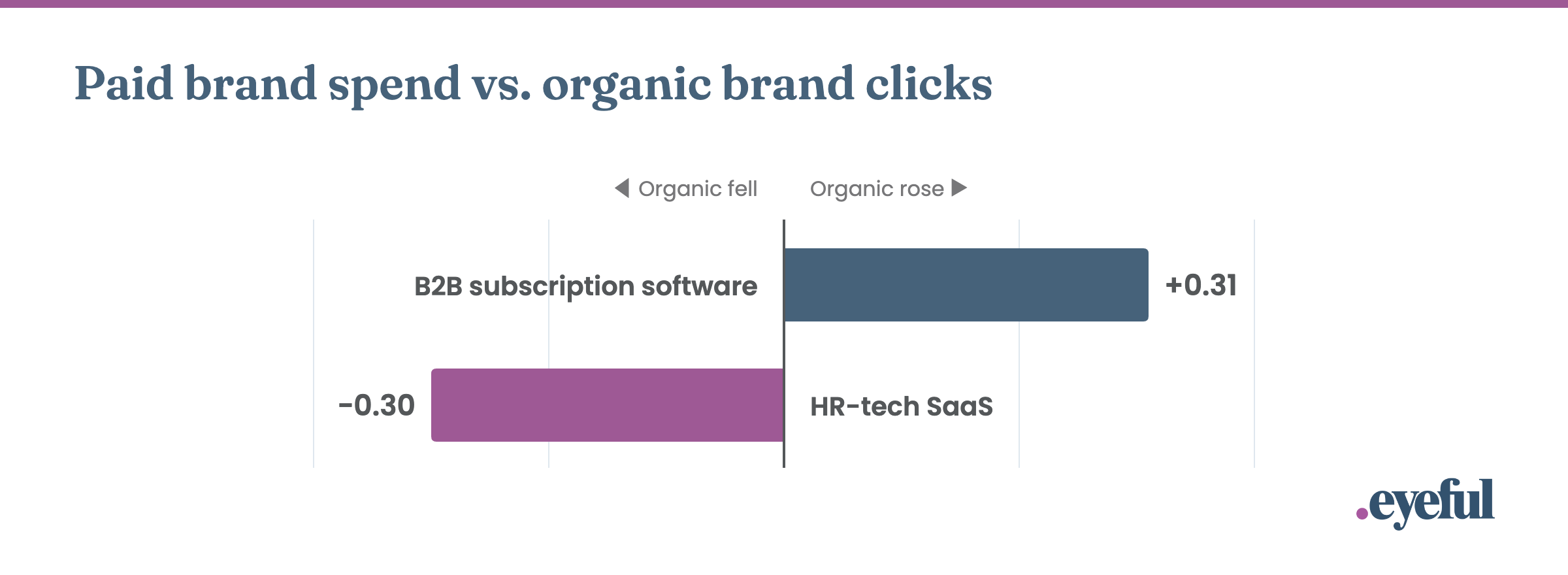
Figure 1. Same question, two different answers. Standardized effect of weekly paid brand spend on organic brand clicks, controlling for brand impressions and time trend. B2B subscription software: 58 weeks, combined brand click rate flat at 10–15%. HR-tech SaaS: 49 weeks, p = 0.004. Source: Eyeful client analyses of Google Ads and Search Console data.
Displacement (organic falls when paid rises). At an HR-tech SaaS client, we modeled 49 weeks of brand data. Weeks with more paid brand spend had measurably fewer organic brand clicks than search volume and the time trend would predict. The effect was statistically significant (p = 0.004). Paid ads were taking clicks from the company's own organic listing.
Relabeling (organic and paid rise together, but the total doesn't grow). At a B2B subscription software client, 58 weeks of data showed the opposite pattern on the surface: paid and organic brand clicks rose together. That looks like good news. But the combined brand click rate remained flat, between 10% and 15%, across all spend levels. Both channels were simply following demand. In high-demand weeks, the company paid for more of the clicks it would have gotten anyway. Paid took credit for organic clicks instead of stealing them.
Different mechanics, same bill. That's why we look at the combined click rate and not just the paid-vs-organic trade-off.
When the Brand Budget Grows Faster Than the Business
The same thing happens in ecommerce, where it's easier to tie to revenue.
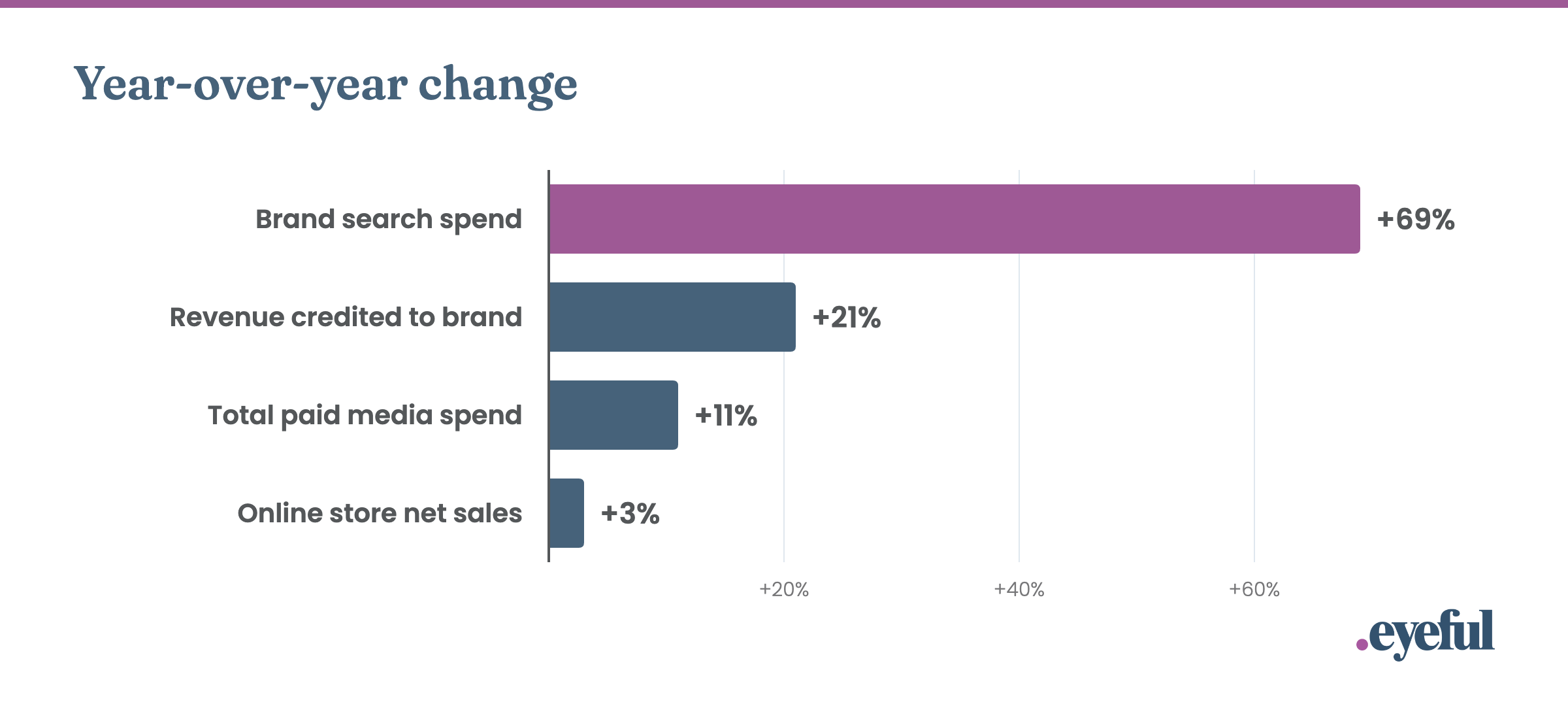
Figure 2. Brand spend grew 69%; sales grew 3%. Premium home-goods retailer, fiscal year over fiscal year. Brand search spend rose from $225K to $379K, and its platform-reported ROAS fell from 10.2× to 7.3×. Total Google + Meta spend rose from $1.49M to $1.65M. Blended MER fell from 6.17× to 5.75×. Source: Eyeful analysis of Shopify, Google Ads and Triple Whale data.
When a premium home-goods retailer bumped its brand search budget by 69%, the attribution platform reported a 21% jump in brand revenue. In reality, total net sales grew by just 3%, causing blended MER to slip from 6.17× to 5.75×.
Here's the marginal math: brand campaigns averaged about 10× ROAS the year before. The extra $154K returned about 3×, and that's by the attribution platform's own count, which tends to be generous. The average return made the campaign look like a place to scale. The return on the added dollars said otherwise.
Step 4: Don’t Mistake Correlation for Proof
Everything above is a screening test, not a controlled experiment. Brand demand moves with offline advertising, PR, seasonality, competitors and the economy. SERP layout, device mix, rankings and tracking changes can all move the numbers, too.
When the screen raises a flag, test it. Reduce brand coverage in selected regions or time periods, ideally against matched control groups. Then measure total brand visits, conversions, revenue and contribution margin across paid and organic, not just what happens inside Google Ads.
Two practical notes from running these tests:
Start where the risk is lowest. If your search terms include login, support or existing-customer queries, pull those out of paid first. They're the least likely to be incremental and the least risky to test.
Don't run your test in your slow season. At the B2B software client above, a campaign pause that overlapped with Q4 was followed by a 13% drop in brand clicks, and we couldn't separate it from the normal seasonal decline. Run tests during steady demand so the result means something.
The goal is to determine whether the customers and margin you gain from paid brand coverage are worth what you pay.
The Takeaway: Measure the Business, Not the Channel’s Credit
Brand search looks great because the customer already wants you. That's also why its attribution can't be trusted on its own.
Before increasing your brand budget based on ROAS alone, look at total brand traffic and revenue. While paid ads can drive true incremental growth, the actual lift is often much smaller than your dashboard implies
That doesn't mean you should turn off branded search. Paid brand ads can defend against competitors, give you control over messaging and landing pages, and keep you visible in the auction. Those benefits are real. They just need their own measurements and budget logic, which we cover in the companion piece.
Not sure what your brand campaign is actually earning? Eyeful's senior practitioners run this analysis with clients' own Google Ads, Search Console and revenue data, then design the test that settles the question. Let's talk.
Measurement reference: Google Ads Help, About measuring paid and organic search results.
Client examples are anonymized and drawn from Eyeful analyses conducted in 2025–2026.